Case Study: Optimizing AI Image Generation
Note: This entire guide and workflow - from problem identification through implementation and documentation - was created through real-time voice conversation using Claude and Gemini over approximately 2 hours. Using The Bitcoin Heuristic article as narrative context, I used Mac Whisper for speech-to-text and GitHub Copilot to orchestrate agent skills for image generation (Nano Banana Pro), shell scripting, and iterative validation in a single session.
Overview
I was preparing a keynote presentation for the engineering team at Strike, talking about our AI evolution, the work I'd been doing, and our roadmap. Through this process, I noticed a pattern: the journey teams take with AI mirrors the Bitcoin adoption journey almost exactly. Same stages, same traps, same breakthrough moments.
This felt like a critical insight worth highlighting in the presentation, so I needed compelling visuals. I generated an initial set of Wojak meme characters - one for each stage of both journeys - to bring the concept to life in the slides.

The final set of 10 characters: 5 Bitcoin journey stages (top row) and 5 AI journey stages (bottom row)
That weekend, I decided to write up the full thesis in detail. That became The Bitcoin Heuristic article. As I was publishing it, I realized the images needed work - style inconsistencies, background issues. The initial script I'd built for the presentation was basic (good enough for slides), but I wanted something more robust: proper validation, consistent style enforcement, observability for debugging.
What started as "improve the generation script" turned into a case study in validation, iteration, and why semantic AI evaluation beats pixel heuristics.
The Problem
The Bitcoin Heuristic article told a story in stages - how people's understanding of Bitcoin evolved over time. To visualize it, I needed a character for each stage: an archetype showing what adoption looked like at different points.
The Bitcoin journey had five stages: the skeptic (dismissive, angry at the idea), the tourist (excited but clueless), the speculator (manic energy, focused on gains), the student (starting to understand the fundamentals), and the maximalist (fully committed, stoic conviction). The AI journey mirrored this same arc: skeptic, casual explorer, prompt engineer (trying to figure the tool out), pragmatist (understanding real-world applications), and finally the native (thinking in AI capabilities as default).
The requirements were strict:
- Consistent classic Wojak meme aesthetic (that crude MS Paint style the internet recognizes)
- Solid pitch-black backgrounds - no gradients, no transparency
- Character fills the entire frame edge-to-edge
- Each character visually distinct enough to show progression
I also needed both high-resolution archival versions (4K) and web-optimized files (1024px) to use on the website.
The Initial Approach
The first iteration was simple: a bash script that looped through a list of prompts and called a Python wrapper for the Gemini API. The goal was to generate the full set of 10 characters—one for each stage of the Bitcoin and AI journeys—in a single automated pass.
Here’s an example of the prompt used for the "Bitcoin Skeptic" character:
[CRITICAL REQUIREMENTS]
1) Background: SOLID PITCH BLACK (#000000) - never white, never gray, never gradient.
2) Composition: Character fills the entire frame edge-to-edge, NO padding or borders.
3) Style: MS Paint meme aesthetic.

Hand drawn internet meme illustration of Pink Wojak (SOLID PINK skin fill, not outline),
screaming in anger, veins popping, wearing a business suit (banker), with red falling
financial chart candles and Bitcoin logos floating around him.

Crude MS Paint style, rough black outlines. The pink skin must be SOLID FILL.
Remember: BLACK background only, character fills frame.
I expected this to be a "set it and forget it" task. I was wrong.
The First Attempts
Three immediate problems surfaced:
- Style Drift: Some images came out as pixelated 8-bit art, others as outline art instead of the consistent classic Wojak meme style.
- Background Violations: Despite the strict prompt requirements, the model wouldn't consistently produce the solid pitch-black background needed for the keynote.
- Observability Gap: Since the goal was a 'clean' final set of 10 images, the script didn't save any of the discarded intermediate attempts. Without a record of what went wrong, I had no data to use for iterating on the prompts.
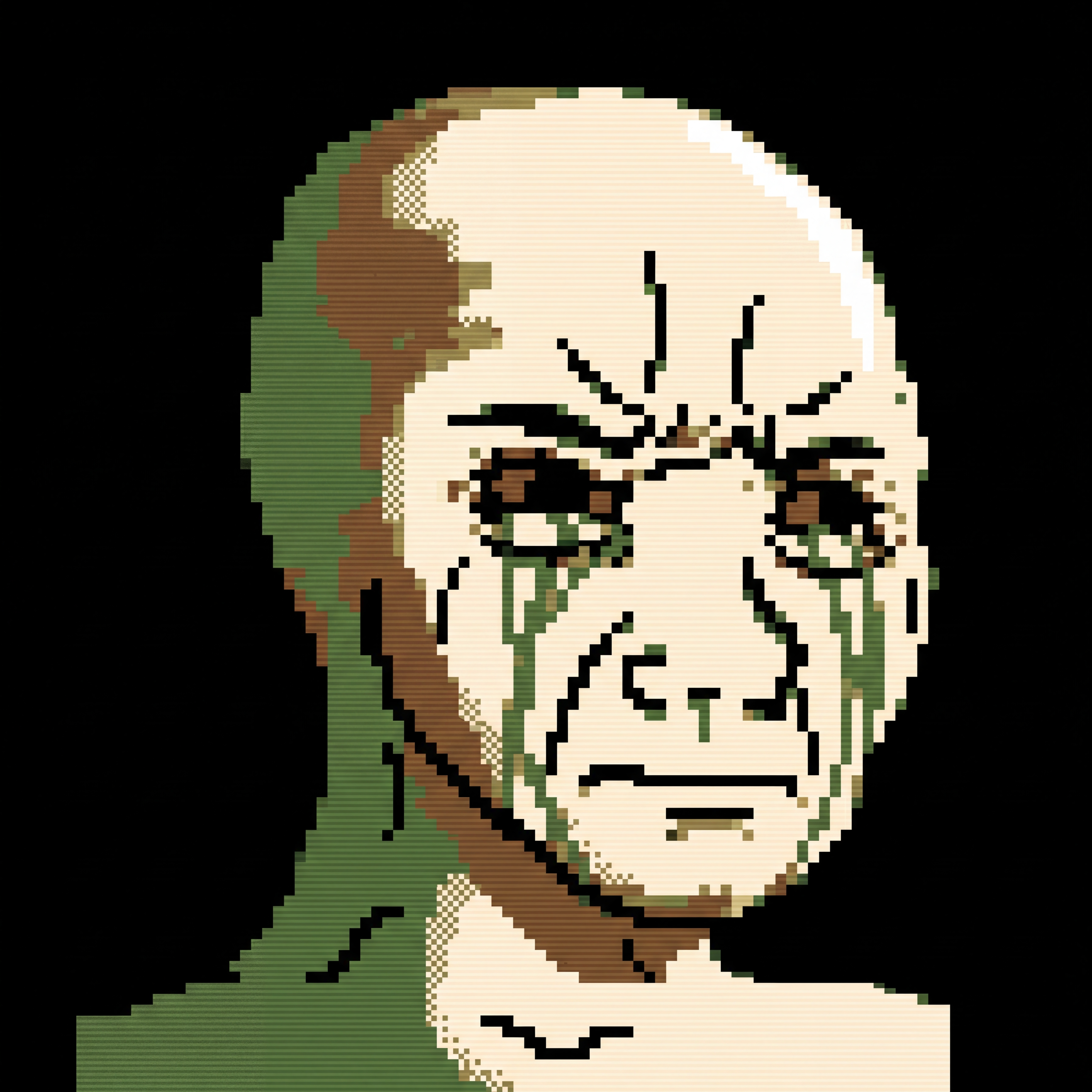
Failure: 8-bit pixel art instead of MS Paint style
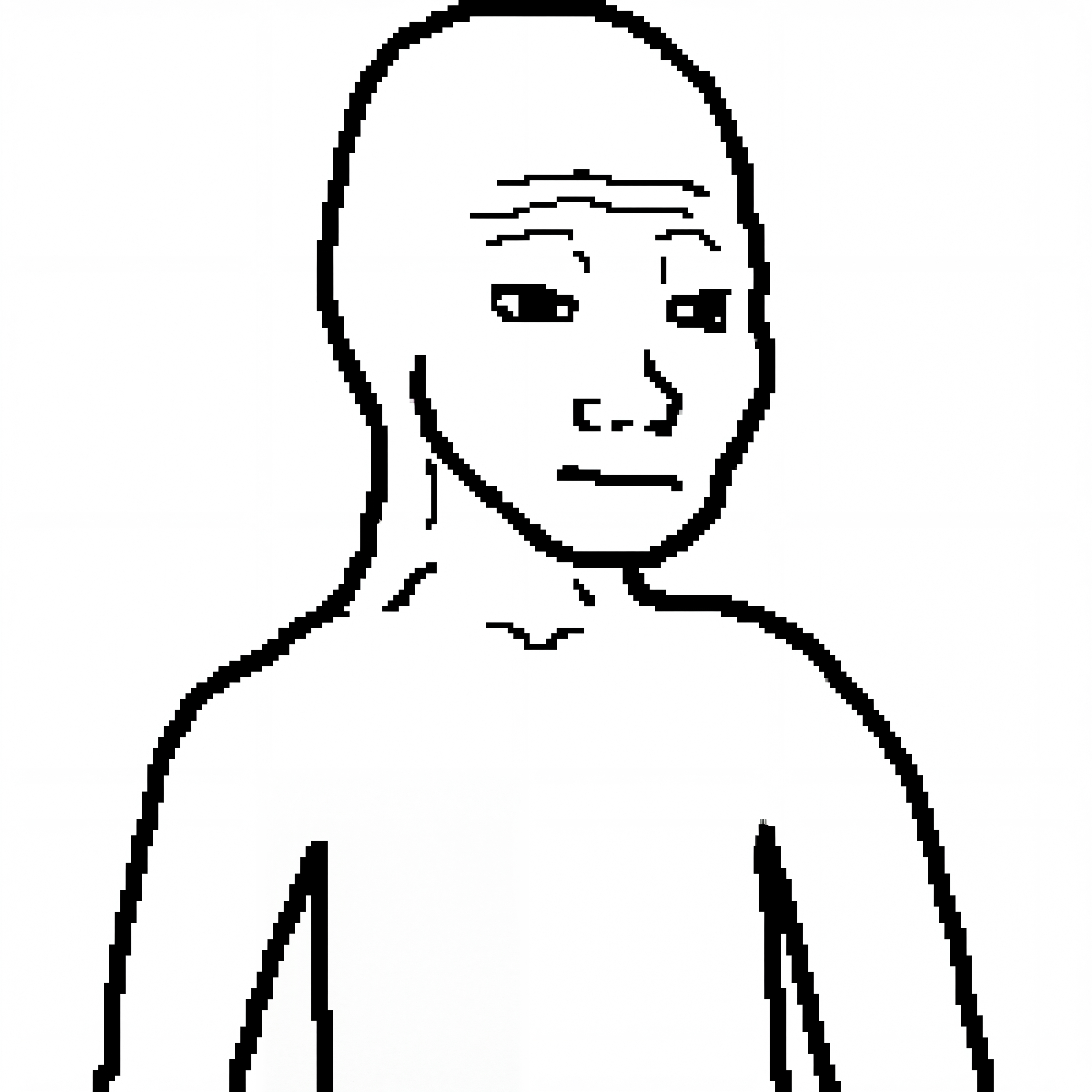
Failure: Outline only, no color fills
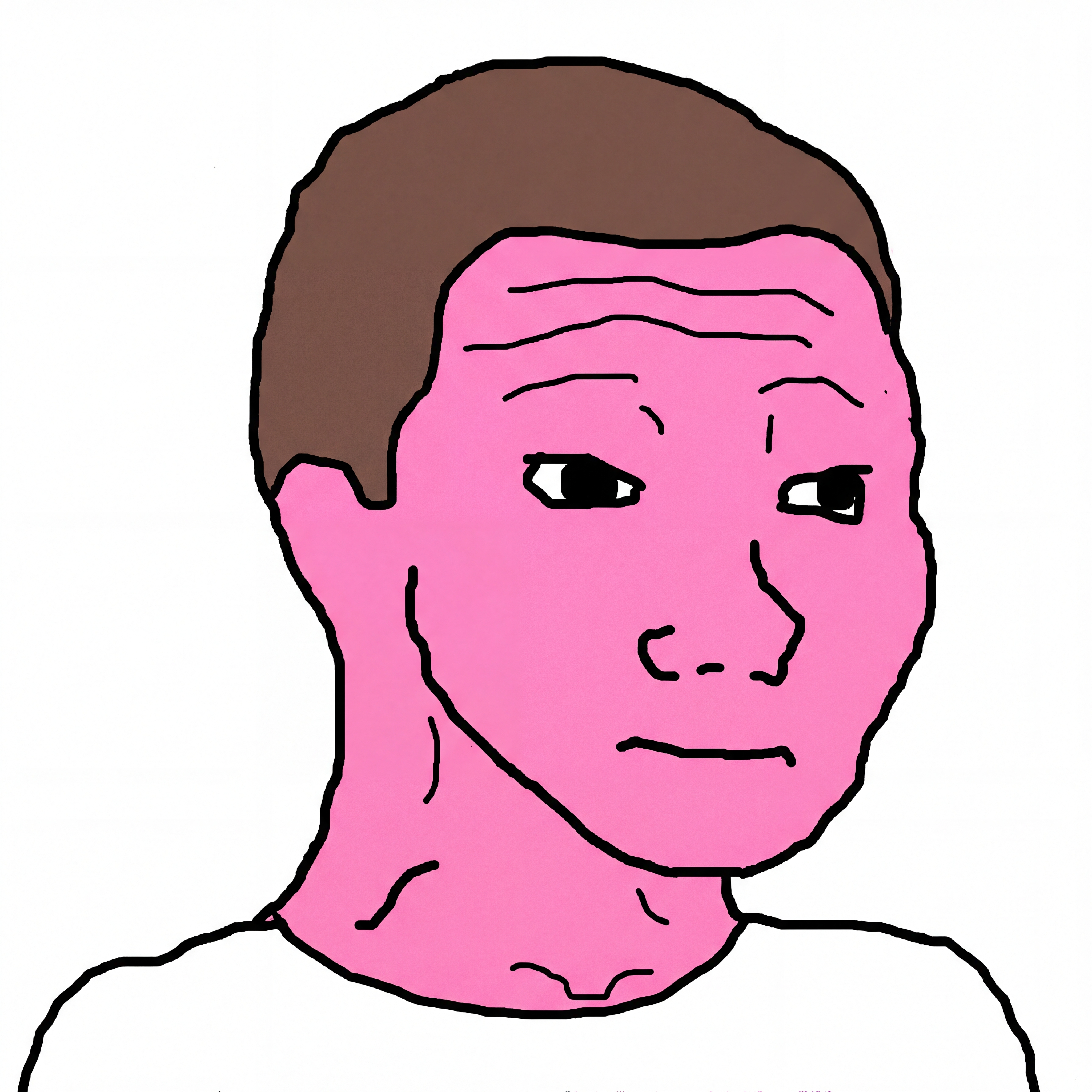
Success: Classic MS Paint with solid fills
Attempt 1: Fix It In Post
First idea: use better prompts and then clean up the image afterward with ImageMagick.
I added explicit style requirements ("MS Paint aesthetic", "crude black outlines") and used ImageMagick's flood-fill to darken any non-black background pixels.
The problem: Flood-fill is naive. It destroyed the character details - pink faces became just black outlines, all the internal character work vanished. The algorithm couldn't tell the difference between "this should be black" and "this is part of the character."
Bigger issue: I was treating a symptom, not the cause. The real problem was that the generator wasn't producing black backgrounds in the first place. Lesson learned: Don't fix generation problems with image processing. Fix them upstream.
Attempt 2: Trust The Algorithm
Next idea: stop post-processing and instead validate each image. Generate, check if the background is black, retry if not.
I built a validator that sampled 100x100px crops from each corner of the image, averaged their brightness, and said "if it's darker than 15%, it's good."
This actually worked... until I started saving the failed attempts to debug what was happening.
The Discovery
I looked at what the validator was rejecting and found something infuriating: most of them actually had black backgrounds. The validator was throwing away good images.
The issue: corner sampling is too simple. When a character has a glowing orange aura, the corner crop catches the glow, not the background. When text appears near the edge ("UP! UP! UP!"), same problem.
By the numbers: Of 17 images the validator rejected, 12 actually had black backgrounds when I checked them manually with Gemini. That's a 70% false positive rate. The validator was actively making things worse.

False Positive: Glowing aura near edges triggers rejection, but background is actually black
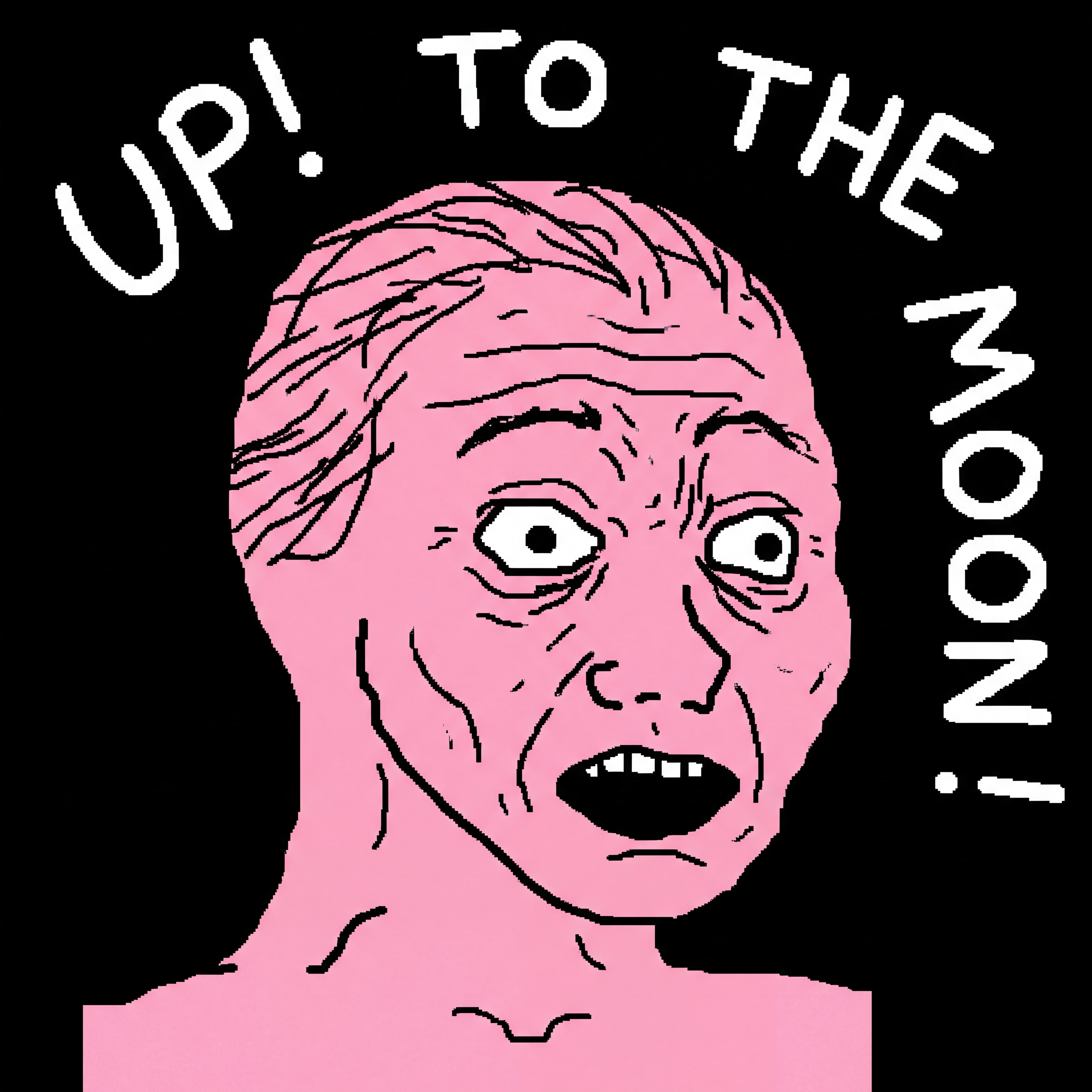
False Positive: Text "UP! UP! UP!" near edges triggers rejection, but background is black
Attempt 3: Semantic Validation
The real insight: "Is this background black?" isn't a pixel problem. It's a semantic problem. You need something that understands what "background" means - i.e., that an orange glow isn't the background, that a white character face isn't a background problem, that text overlays are foreground.
I built eval_background.py to use Gemini's vision model instead of pixel sampling.
The Prompt:
Analyze this image and determine if it has a solid black or very dark background.

IMPORTANT: Focus on the BACKGROUND areas (edges, negative space around the
subject), NOT on the subject/character itself.

Do NOT consider these as background issues:
- A character with white/light colored skin
- A character with a glowing aura or glow effects around them
- Text or UI elements that are part of the foreground
- Computer monitors or screens that are part of the scene

Answer with ONLY one word: PASS or FAIL
Why This Works:
- Gemini understands context. An orange glow isn't the background.
- It knows a white Wojak face isn't a background problem.
- It distinguishes between character details and actual background.
- It's trained on real-world images and knows what backgrounds look like.
Implementation:
# The main validation function now calls Gemini
eval_result=$(uv run "eval_background.py" "$image_file")
eval_status=$(echo "$eval_result" | cut -d'|' -f1)

if [[ "$eval_status" == "PASS" ]]; then
  # Accept and create web version
else
  # Reject and retry
fi
Cost & Model Choice: The implementation originally used Gemini 2.0 Flash for validation. However, Gemini 2.0 Flash is now deprecated (shuts down March 31, 2026). Future implementations should migrate to Gemini 2.5 Flash or Gemini 3.0 Flash Preview - though vision input costs on newer models run 3-5x higher than the deprecated 2.0 Flash. The cost increase is still cheaper than manual validation, but worth noting for budget planning. I chose Flash over Pro because binary classification doesn't require advanced reasoning capabilities.
The Style Problem
I also had to fix inconsistent style rendering. Some images came out as pixelated 8-bit art when I wanted smooth classic Wojak meme style. The fix was blunt: explicitly tell the model what NOT to do.
Original: "GigaChad Wojak (strong jawline drawn crudely in MS Paint style)"
Fixed: "GigaChad Wojak in classic Wojak meme style (NOT pixel art, NOT 8-bit). Smooth vector-like meme aesthetic, NOT retro pixel art."
This is counterintuitive but it works. Models understand negatives pretty well when you pair them with context. It's specific enough to override the default "retro pixel art" interpretation of "meme."
Final Architecture
The final system works as follows:
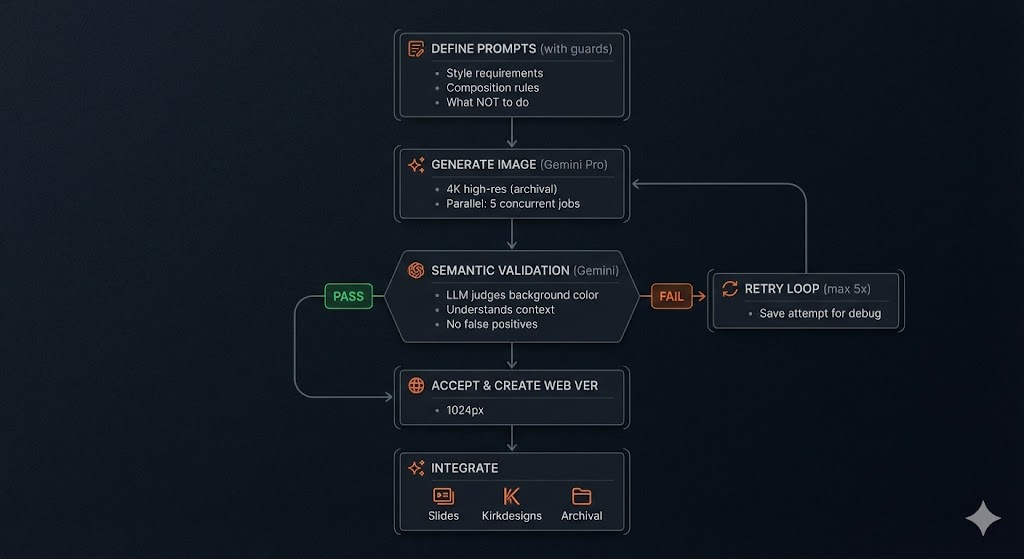
The complete system flow - from prompt definition through validation and integration
Results & Metrics
Before Optimization
- Success Rate: ~70% - several images would fail on first attempt, requiring manual intervention
- False Positives: 70% of rejected images actually had valid black backgrounds
- Debugging: Impossible - failed attempts weren't saved
- Style Consistency: Some images were pixel art, others classic meme style - inconsistent aesthetic
- Time: Manual tweaking and verification as needed for failures
After Optimization
- Success Rate: 100% - all 10 images generated successfully
- Efficiency: 1.2 attempts per final image (12 total generations for 10 assets)
- False Positives: 0% - Gemini semantic evaluation eliminates guessing
- Debugging: Complete - all failed attempts saved with timestamps and metadata
- Style Consistency: All 10 images now use consistent classic Wojak meme aesthetic
- Total Cost: < $1.00 (12 generations via Pro + 12 validations via Flash)
- Automation: Can re-run any subset with
./generate_wojak_assets.sh btc ai-nativewithout manual intervention
Key Techniques
1. Use Semantic Evaluation, Not Heuristics
When evaluating AI outputs, prefer another AI system with semantic understanding (like Gemini vision) over pixel-level heuristics. Seems expensive and redundant at first, but accuracy gains and elimination of false positives make it worth the cost.
2. Save Failed Attempts for Inspection
Never discard failures. They provide:
- Evidence of what doesn't work
- Input for better prompts next time
- Leverage for manual review if needed
3. Combine Positive and Negative Instructions
"Don't do pixel art" paired with "do classic meme style" beats either alone. The real power comes from anchoring with context on both sides - telling the model what you want AND what you don't want. The article's fix used both together: "GigaChad Wojak in classic Wojak meme style (NOT pixel art, NOT 8-bit). Smooth vector-like meme aesthetic, NOT retro pixel art." Negations without guidance can leave the model guessing; positives without exclusions can default to common misconceptions.
4. Retry Logic Alone Won't Fix Bad Validation
Retrying with the same prompt usually just fails the same way. Better to fix the evaluator than add more attempts.
5. Parallelize What You Can
5 concurrent image generations beats sequential one-at-a-time. For batch tasks, parallelization is usually the biggest time win.
6. Model Economics Change Over Time
The cost calculus shifts as models evolve. Gemini 2.0 Flash ($0.02/eval) was deprecated within months, replaced by 2.5 Flash ($0.06/eval) and 3.0 Flash Preview ($0.10/eval). Budget for API cost increases - what's cheap today may be 5x more expensive (or unavailable) next year. Factor model lifecycle into production planning.
What I Learned
This didn't feel like a lesson in image generation. It felt like a lesson in evaluation and iteration.
Production AI image generation isn't just calling an API and hoping. It's about:
- Knowing what you need. I needed images with specific styles and black backgrounds, not just "images."
- Catching failures early. Without saving attempts, I never would have discovered the 70% false positive rate.
- Recognizing where intuition breaks. Pixel sampling seemed sensible until I actually looked at what it was doing.
- Iterating on the right thing. Better prompts help, but better validation helped more.
The jump from 70% false positives to 0% didn't come from computing power or larger models. It came from asking a different question: "Should I scan pixels or ask an AI?" Once I asked that, the answer was obvious. But I had to fail first to see it.